- DATE:
- AUTHOR:
- The Fountain team
Document Template Customization for Every Hire Customer
Build document templates with merge keys and conditional blocks, and Fountain generates each applicant's document for review, editing and signature.
Document Signing templates were static. When a document varied by applicant, such as an offer letter with negotiated benefits, exempt or non-exempt status, bonuses, equity, relocation or location-specific legal language, teams edited the file outside Fountain and kept a separate template for every variant.
What's new
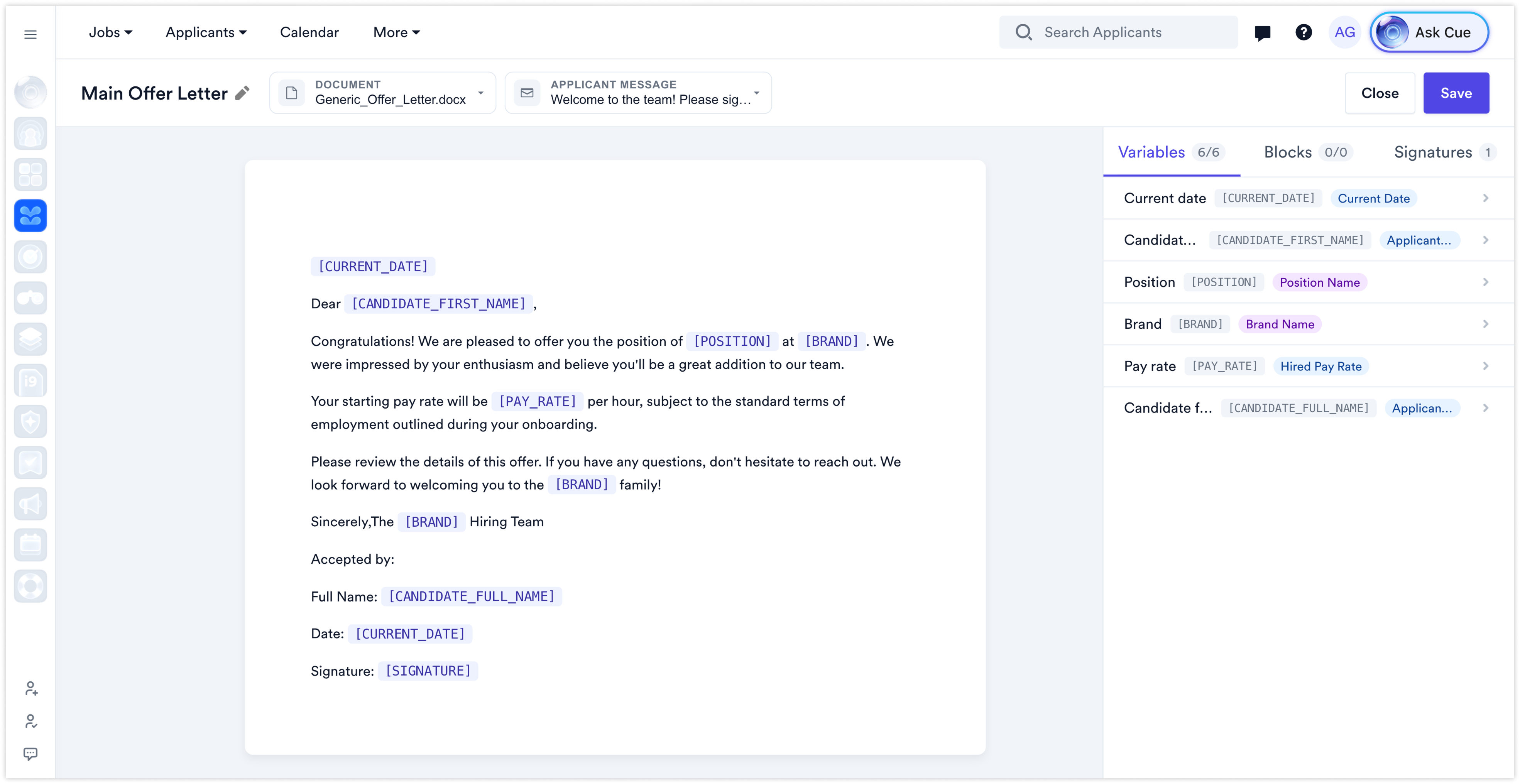
Variables and conditional content — upload a .docx with variables in square brackets, such as [PAY_RATE], and wrap content that should only appear when a condition is true in a block, such as {{#BlockName}}…{{/}}. Fountain detects each one on upload.
A new template editor — each template opens on a document canvas with Variables, Blocks and Signatures tabs, replacing the document keeps its variables and signature fields, and the template list shows each template's signers, variables, conditional blocks and the workflows that use it.
Map variables to your data — link each variable to a Fountain field, such as Position Name or Hired Pay Rate, and choose its format. The Variables tab shows how many variables are mapped and flags any that aren't.
Conditions on your data — give each block one or more conditions on a data key, such as Compensation equals Hourly. The block appears when any of its conditions is true, and a condition can reveal further fields.
Signers placed in the document — add signers on the Signatures tab and place each signature with a merge key such as [SIGNATURE].
A title and message for the applicant — each template carries the document title and message the applicant sees in their portal alongside the document.
A form built from the template — when a document is sent, there is one input per variable, values already collected are filled in, and free-text variables take one-off language such as negotiated commission terms.
Preview, edit and send — check each value, see the document as the applicant will with every block resolved, download it or upload a custom document in its place, then send it for signature. Edited values are saved to the applicant record.
Formatting survives — logos, footers, fonts, tables and multi-page layouts come through generation and signing intact.
Why it matters
One master template replaces a document set per variant, and the signed document is generated by Fountain rather than assembled by hand, which removes a step where mistakes reach an applicant in writing.
What to expect
Creating a new template now opens the new template editor by default, and a template can start from a .docx or .pdf file up to 10 MB. Existing PDF templates keep working and stay in the same template list; nothing is converted. Templates are sent by a recruiter rather than when an applicant reaches the stage, and until then the applicant portal shows that the document is being prepared. A missing variable stops the document with an error rather than leaving a blank, and a block with no conditions is left out of the document. Because templates often produce legally significant documents such as offer letters, have your legal or compliance team review master templates before you adopt them. Offers built from templates can also go through approval rules, announced separately in Offer and Opening Approvals.
Availability
Available to all Hire customers.





